
AI Voice Reader
AI Voice Reader transforms text-based books into natural-sounding audio narration. When a book is available only as text (not DAISY audio), the default reading option is a system screen reader voice. AI Voice offers an alternative — 28 natural voices across 8 languages with different character, tone, and pacing.
Before and After
Section titled “Before and After”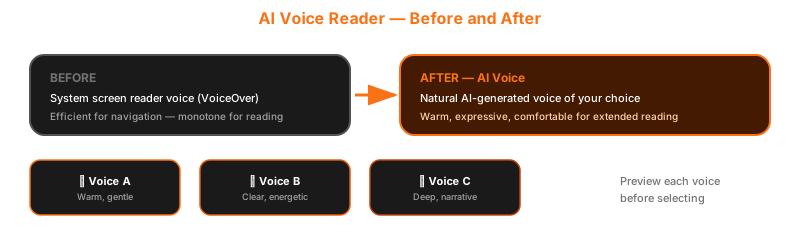
How It Works
Section titled “How It Works”- Open a text-format book in the reader
- The book opens with the default system voice (screen reader TTS)
- Tap the Voice Mode selector to open voice options
- Browse 28 available voices — organized by category
- Tap Preview to hear a sample of each voice
- Select your preferred voice — the reader switches immediately
- Continue reading with the new voice
Text reader with default system voice (before switching)
Voice picker — 28 AI voices organized by category with preview buttons
28 Voices, 4 Categories
Section titled “28 Voices, 4 Categories”AI Voice offers a diverse selection of voices to match your preference:
| Category | Description | Voices |
|---|---|---|
| Recommended | Best all-around voices for extended reading | Curated selection |
| Professional | Clear, authoritative delivery | Ideal for non-fiction |
| Warm | Friendly, comfortable tone | Great for novels and stories |
| Soft | Gentle, calm pacing | Perfect for bedtime reading |
Each category includes both male and female voices (14 female, 14 male total). Preview any voice before selecting it.
Voice categories — Recommended, Professional, Warm, Soft — with voice previews
Why It Matters
Section titled “Why It Matters”System screen reader voices (like VoiceOver’s default voice) are designed for navigation — menus, buttons, notifications. They are efficient for short announcements.
For extended reading — an hour of listening, an evening with a novel — a different kind of voice makes the experience more comfortable. AI Voice provides voices that are:
- Warmer — natural intonation and expression
- Clearer — optimized for long-form content
- Varied — 28 options to match your preference
Auto-Translation
Section titled “Auto-Translation”AI Voice can read books in a different language from their original text. This means:
- A Thai text book can be read aloud in English, Japanese, or any supported language
- An English book can be read in Thai or Korean
- The AI translates on the fly as it reads
8 Supported Languages
Section titled “8 Supported Languages”| Language | Available |
|---|---|
| Thai | Yes |
| English | Yes |
| Chinese | Yes |
| Japanese | Yes |
| Korean | Yes |
| Spanish | Yes |
| French | Yes |
| German | Yes |
This is a powerful accessibility and language-learning feature — a blind Thai reader can access English-only books in their native language, or a language student can hear books read in their target language.
Language selection for AI Voice — choose output language different from book's original language
Speed Control
Section titled “Speed Control”Adjust the AI Voice reading speed from 0.5x to 4.0x. Speed changes apply without pitch distortion.
Two Generation Modes
Section titled “Two Generation Modes”AI Voice offers two processing modes, selectable based on your preference:
| Mode | How It Works | Best For |
|---|---|---|
| Standard | Generates audio in chunks via REST API | Reliable on all network conditions |
| Live | Streams audio in real time | Faster playback start, requires stable connection |
Both modes produce the same voice quality. The difference is in how the audio is delivered to your device.
Compatibility
Section titled “Compatibility”AI Voice Reader is available for text-format books only. DAISY audio books already include human narration and do not use AI Voice.
VoiceOver Shortcuts
Section titled “VoiceOver Shortcuts”| Gesture | Action |
|---|---|
| Magic Tap (two-finger double-tap) | Play / Pause reading |
| Escape (two-finger scrub) | Close reader |
| Swipe up (on reader) | Next text chunk |
| Swipe down (on reader) | Previous text chunk |
| Custom action: “Change Voice” | Switch to a different AI voice |
| Custom action: “Adjust Speed” | Change reading speed |