
AI Live Chat
AI Live Chat is a real-time spoken conversation with an AI assistant. Unlike AI Search (which is text-based with voice input), Live Chat is a continuous voice dialogue — you speak, the AI responds by voice immediately, and the conversation flows naturally.
How It Works
Section titled “How It Works”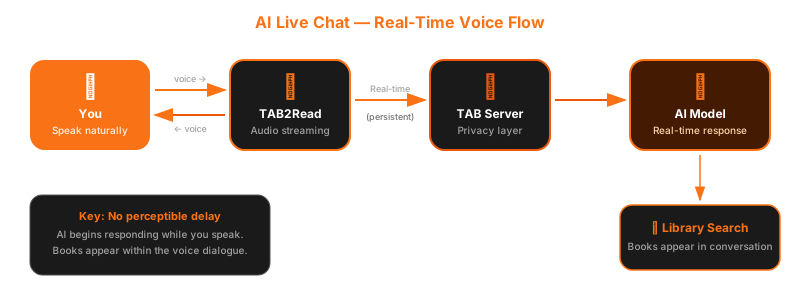
- Open the Library tab and tap the Live Chat button
- A connection establishes — indicated by a brief status message
- Start speaking — the AI listens and responds by voice in real time
- Continue the conversation — ask follow-up questions, refine your preferences
- Book results appear within the conversation — no screen change required
- End the session when you are finished
Live Chat in Action
Section titled “Live Chat in Action”Below is a real conversation showing how AI Live Chat works — from greeting through book discovery.


As the conversation continues, you can ask follow-up questions and get more recommendations:


What You Can Do
Section titled “What You Can Do”- Ask for recommendations — “What’s a good book to listen to before bed?”
- Describe your mood — “I want something relaxing, maybe nature writing.”
- Ask about a specific book — “Tell me more about this title.”
- Request comparisons — “Which of these is shorter?”
- Navigate results — books appear as tappable cards within the conversation
Real-Time Voice
Section titled “Real-Time Voice”The conversation has no perceptible delay. When you speak, the AI begins responding while you are still finishing your sentence. This creates a natural conversational rhythm — not a series of request-and-response exchanges.
This is possible because the app maintains a persistent audio connection to the AI backend, streaming audio in both directions continuously.
In-Conversation Book Discovery
Section titled “In-Conversation Book Discovery”When the conversation warrants a library search, the AI searches automatically. Results appear within the voice dialogue — you hear about the books as part of the conversation, and tappable book cards appear in the interface.
There is no separate search screen. Discovery happens within the flow of dialogue.
Session Management
Section titled “Session Management”- Each conversation maintains its own context — the AI remembers what was discussed
- Sessions have a defined duration to manage resources
- You can start a new conversation at any time
- Security is handled through short-lived tokens that expire automatically
VoiceOver Shortcuts
Section titled “VoiceOver Shortcuts”| Gesture | Action |
|---|---|
| Magic Tap (two-finger double-tap) | Mute / Unmute microphone |
| Escape (two-finger scrub) | End chat session |
All book cards within the conversation are fully accessible — VoiceOver announces titles, authors, and available actions for each result.